What is a Community Leaderboard? Benefits, Examples, and Setup Guide

Anum Basit
Head of Content
14 min read

Head of Content
Leaderboards emphasize people’s achievements in relation to others, giving them a clearer view of their skill (or engagement) level.
Why do some communities feel alive with activity while others struggle to get replies? Often, the difference lies in how well they engage their members. One powerful yet underrated tool is the community leaderboard, a dynamic ranking system that showcases your most active, helpful, or valuable members.
In this post, you’ll learn why leaderboards work, how brands use them to boost engagement, and how to set one up for your own community, step by step.
Whether you run a course community, a creator hub, or a private member space for your brand, this guide will show you how to make your leaderboard a magnet for participation.
A community leaderboard is a dynamic feature used by online communities to showcase top members based on their contributions, activity, and overall engagement.
A leaderboard is a major gamification tool that helps develop healthy competition among the community members, by recognizing and encouraging active participants. It is usually displayed as a list, such as Top 10 contributors of this week.
By publishing posts, leaving comments, voting in polls, finishing challenges, and engaging in other activities, members can accrue points. Their standing on the leaderboard is determined by the accumulation of these points.
In order to reward members for their efforts and create a sense of accomplishment, leaderboards frequently incorporate rankings or titles based on points gained, incorporating a progression system similar to a game.
Leaderboards encourage members to take part more regularly and significantly by highlighting the topmost or active contributors, building a livelier and more dynamic community.
In order to promote healthy competition and boost participation, community leaderboards are used in a variety of online communities and platforms to monitor and highlight the most involved or active individuals.
Leaderboards are used to list the most active members based on points accrued through activities such as posting, commenting, voting in polls, and completing challenges.
Community leaderboards usually rank members monthly and all-time based on their engagement, encouraging participation by awarding points for different interactions like inspiring posts, feedback, and likes.
On YouTube live streams, a Community Leaderboard ranks viewers based on their engagement activities such as live chat participation, Super Chats, and stickers. This adds a competitive and fun element to live streams, motivating viewers to be more active. The leaderboard highlights top contributors with crowns or badges in the chart.
Platforms like Vercel use community leaderboards to honor top contributors who share ideas, provide feedback, and help others, recognizing them with special titles and swag to incentivize ongoing engagement.
Some tools allow setting up points-based leaderboards to motivate users by awarding points for activities like creating topics, replies, and receiving likes. These leaderboards can be configured with weekly and all-time views and can be displayed on community homepages to highlight top users.
Some projects implement leaderboards for users who opt-in to community features, showcasing top performers based on metrics like page views and link clicks to encourage friendly competition and engagement.
In summary, community leaderboards are widely used in online communities, live streaming, software development forums, customer support platforms, and gamified environments to encourage active participation, recognize top contributors, and build engagement through friendly competition
The design and type of leaderboard can vary depending on the community’s goals, the activities being measured, and the desired outcomes.
Community leaderboards are a proven tool for increasing engagement and participation across online communities, learning platforms, and workplace environments. Their effectiveness stems from several interconnected psychological and social dynamics.
Leaderboards introduce a sense of competition by ranking members based on their activity, contributions, or achievements. This visible ranking system taps into the natural human desire for accomplishment and recognition, motivating users to improve their performance to climb the ranks.
The thrill of seeing one’s name rise on a leaderboard can be a powerful incentive, leading to increased contributions and sustained participation.
By regularly updating rankings, leaderboards provide ongoing feedback and a reason for members to return and stay active. This continuous loop of feedback and recognition encourages users to keep participating, making engagement habitual rather than sporadic.
Leaderboards create a sense of community by making individual and group achievements visible to all members. Public recognition of top performers creates opportunities for social influence, i.e. members are inspired by each other’s progress, which can lead to friendly rivalry, peer encouragement, and a stronger sense of belonging. This shared experience helps build loyalty and a collective identity within the community.
Being featured on a leaderboard provides public recognition, which can be as motivating as tangible rewards. This acknowledgment of effort and achievement boosts satisfaction and pride, reinforcing positive behaviors and encouraging continued participation.
Leaderboards make the criteria for success clear and objective, which enhances transparency within the community. Members understand how their contributions are measured and can track their progress relative to others, building trust and accountability.
While leaderboards are often associated with competition, they can also promote collaboration. Members may form alliances or teams to improve their collective ranking, leading to greater cooperation and knowledge sharing.
Some platforms even use leaderboards to facilitate networking and connections among members.
Leaderboards leverage fundamental psychological drivers such as the need for accomplishment and the tendency to compare oneself to others — Social Comparison Theory. These drivers help users gauge their own progress and motivate them to improve.
Leaderboards can be tailored to align with specific community objectives, whether it’s encouraging content creation, boosting sales, or increasing participation in challenges. By defining clear and relevant criteria for ranking, leaderboards can direct member behavior toward desired outcomes.
Online communities across various domains use leaderboards to drive engagement, recognize top contributors, and encourage competition.
Here are several real-world examples:
Stack Overflow, a leading Q&A site for programmers, features a comprehensive leaderboard system. Users earn reputation points for helpful answers and questions, with top contributors prominently displayed on leaderboards.
This system motivates active participation and highlights expertise within the community.
Duolingo, the language learning platform, uses weekly leaderboards to encourage users to practice consistently. Learners compete in leagues, moving up or down based on their activity and performance, which gamifies the learning experience and boosts retention.
Reddit, a massive social news and discussion site, incorporates karma points and awards to recognize user contributions. Subreddits often feature leaderboards for top posters or commenters, encouraging quality content and active participation.
GiveCampus, a fundraising platform, utilizes leaderboards to boost donations during campaigns. Schools and organizations display real-time rankings of donors or fundraising teams, creating excitement and friendly competition to maximize contributions.
Delphix, a SaaS data operations platform, leverages its online community to scale advocacy and recognize top contributors. Their leaderboard system highlights active members, cultivating a sense of achievement and encouraging ongoing engagement.
These examples show how leaderboards can be adapted to suit various online communities, whether focused on learning, technical support, fundraising, or advocacy, to drive engagement and highlight meaningful contributions.
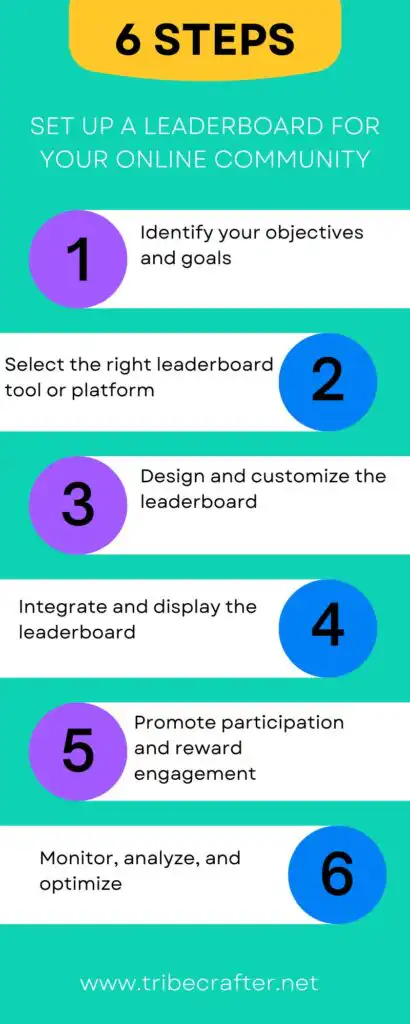
By following these steps, you can create a leaderboard that not only boosts engagement but also strengthens your online community’s sense of achievement and belonging.
By avoiding these mistakes and focusing on inclusivity, meaningful metrics, and dynamic competition, you can create a leaderboard that motivates a wide range of users and sustains engagement in your online community.
Community leaderboards boost engagement by making progress visible, encouraging competition and collaboration, and providing recognition. They tap into deep psychological motivators and help create a vibrant, interactive, and loyal community.
When implemented thoughtfully, leaderboards can transform passive members into active contributors, driving the long-term success of any community.
Planning to add a leaderboard to your community? Start with a clear, simple points system and a regular reset cadence — weekly or monthly. The mechanics matter more than the tool you use to display it.
None of this works without a community to rank in the first place. If you’re still deciding where to build yours, TribeCrafter is an all-in-one community platform that combines groups, courses, events, a blog, and monetization tools in a single product.
See how it works and start building your community today.
It depends on what type of engagement you want to encourage. Common metrics include posts or threads created, comments or replies made, likes or reactions received, questions answered or solutions provided, course or module completions, and attendance at events or sessions. Choose 2–3 core metrics aligned with your community’s purpose.
Yes, if not implemented thoughtfully — in smaller communities, leaderboards can highlight inactivity if the same 2–3 names dominate the list and discourage new or quieter members from participating. Weekly or monthly resets and highlighting different types of contributors helps avoid this.
Weekly for active communities, monthly for moderate engagement, and quarterly or all-time for long-term recognition. Resetting keeps the competition fresh and gives new members a chance.
Use weighted metrics, implement quality filters like minimum word counts or moderator approval, track unique interactions rather than raw quantity, and monitor for unusual activity spikes.
Yes — they can highlight top contributors in technical discussions, recognize subject matter experts, and track certifications or peer endorsements, as long as the leaderboard emphasizes value and credibility over raw volume.
Help shape TribeCrafter. Build and monetize your community, and tell us what you need next.
No credit card required
Get the best community growth
strategies delivered to your inbox.