Book a call
30 minutes on Google Meet. A demo, pricing, moving over from BuddyBoss or another platform, or any question you have.
Prefer to write? Send us a message


Head of Content
Most paid communities are smaller than you’d think. In Heartbeat’s 2026 data on communities with an active paid plan, the median community had just 23 members, and 79% had 100 members or fewer.
That’s good news if you’re just starting. You don’t need a huge audience to run a paid community. You need a clear reason for people to join, a fair price and a place where they actually get value every week.
This guide covers what a paid membership community is, whether it’s worth it, and how to start a paid community in eight steps, from choosing your niche to keeping members after the first month. If you already run a free community and want to explore other ways to earn from it, our guide on how to monetize an online community covers the wider options.
A paid membership community is an online space where members pay for access, usually through a monthly or yearly subscription or a one-time fee. In return, they get things they can’t find for free: expert guidance, focused discussions, learning material and a group of people working on the same problem.
People pay for different reasons. Some want to grow a business or career. Others want support, accountability or simply to learn alongside people who share their interest. Community.inc studied 135 paid communities and found that the most common selling points were business growth (23%), career development (18%), group support (16%) and making money (16%).
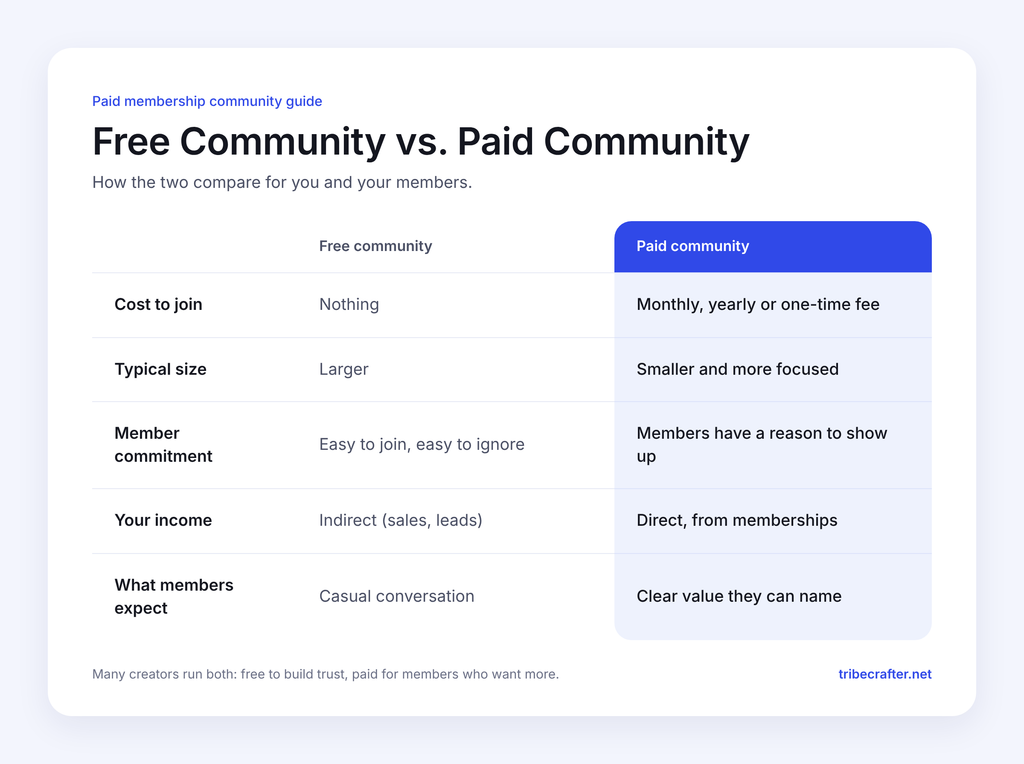
You don’t have to choose one forever. Many creators run a free community to build trust, then offer a paid group or tier for members who want more.
For the right person, yes. A paid community gives you recurring income, and members who pay tend to take part more seriously than people who joined on a whim.
The income can be meaningful even with a small group. In Heartbeat’s data, 8% of paid communities collected $10,000 or more from members over 12 months. The median community in that group had 157 members, and about a third had 100 or fewer.
There are trade-offs, though. A paid community is ongoing work. Members expect you to show up, answer questions and keep things moving. And people leave when budgets get tight: in Heartbeat’s survey of community builders, money getting tight was the reason given most often for a paying member leaving.
A paid community is worth it if you can commit to running it every week, and if you have expertise or access that people value. If you’re not sure yet, test demand first (step 2 below) before you build anything.
“A community for entrepreneurs” is too broad. “A community for freelance designers who want to raise their rates” tells people straight away whether it’s for them.
A narrow niche makes your community easier to describe, easier to price and easier to fill. Write one sentence that says who the community is for and what members will get out of it. If you can’t fit it in one sentence, keep narrowing.
Before you set up anything, find out whether people will pay. A few simple ways to test it:
The first weeks matter more than most people expect. In Heartbeat’s data, new communities that got 10 to 49 members in their first 14 days went on to take payments 97% of the time. For communities that got none, it was 5%. Getting your first members in quickly is a strong early signal.
Your members need to know exactly what they’re paying for. Most paid communities combine a few of these:
Start with fewer things done well. In the Community.inc study, the number of benefits a community offered had no link to its size or price. A community with three benefits members actually use beats one with ten they ignore.
There are four common ways to charge for a membership community:
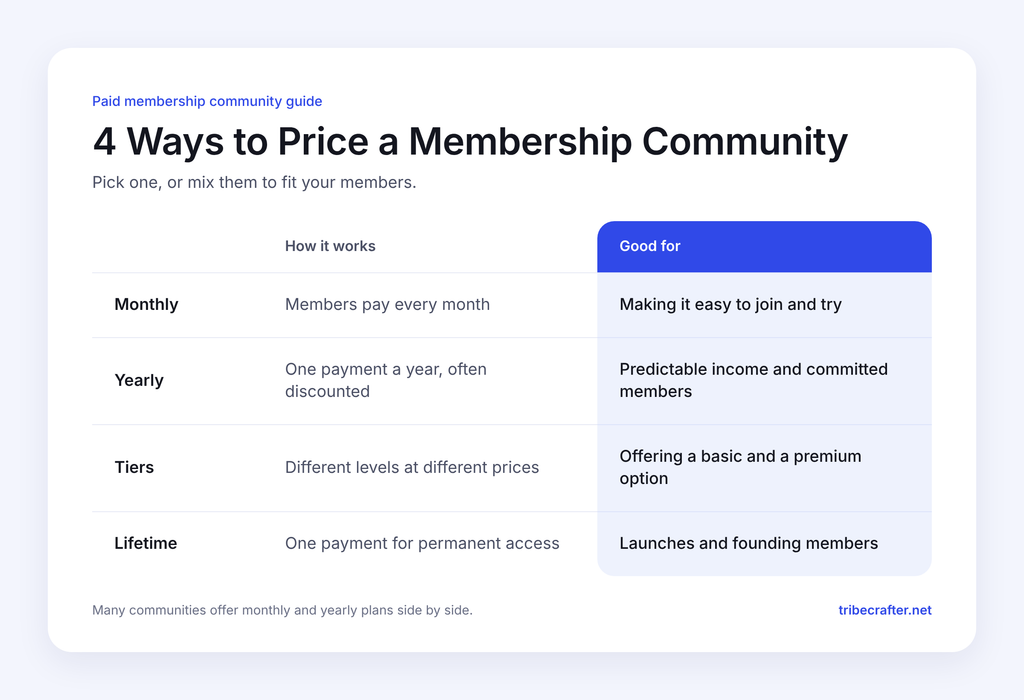
Many communities mix these. Heartbeat found that 49% of paid communities offer a yearly plan, and in the Community.inc study, 51% used tiered plans and 20% offered a lifetime plan.
There’s no single right price, but real data gives you a useful starting point. In Heartbeat’s data on paid communities, the median price of the cheapest plan was $25 a month, and the most common price band was $25 to $49 a month (34% of communities).
Price also depends on the type of community. In the Community.inc study, peer-to-peer communities averaged $83 a month and course-based communities $63, while exclusive, high-access communities charged far more.
To set your price, think about:
It’s easier to raise prices later than to lower them. Many creators start lower for founding members and raise the price for everyone who joins after.
You can run a paid community on Facebook Groups or Discord, but neither was built for it. You’ll usually need extra tools for payments, you can’t control who sees what as easily, and the platform owns your member relationships. Our guide to the disadvantages of Facebook groups covers the problems in more detail.
A dedicated community platform puts everything in one place. On TribeCrafter, you can:
See how membership communities run on TribeCrafter.
Keep the structure simple at the start. A few well-named groups are better than a dozen empty ones. A good first setup includes:
Write your rules before launch so members know what’s expected from day one. Our guide on how to create community guidelines walks you through it.
Then plan what happens when someone joins. A welcome message, a prompt to introduce themselves and a clear “start here” post help new members feel at home. These new member onboarding ideas can help.
Don’t open to the public on day one. Invite your waitlist and closest followers first, as founding members.
Give them a reason to join early, like a lower founding price, lifetime access, or direct input into how the community grows. Founding members bring energy, give honest feedback and become your first testimonials.
Testimonials matter for the public launch. In the Community.inc study, 70% of paid communities used testimonials on their landing pages, and 54% showed photos or videos of members.
A paid community only becomes steady income when members stay past the first few months.
Live events can help. In Heartbeat’s data, new members who signed up for an event in their first 30 days were still active five to six months later 51% of the time, compared with 27% of those who didn’t. That’s a link, not proof of cause, but it’s a good reason to get new members to a live session early.
A few habits that help:
For more ideas, see our guides on member retention strategies and community engagement ideas.
If you’re still choosing a niche, these examples show how a clear promise turns into a paid community:
Choose an idea where you already have knowledge, an audience or both. It’s much easier to fill a community when people already trust you.
You can start a paid membership community with a small audience, as long as you make a clear promise to the right people. Keep it narrow, test it early and start small. Your first 20 members will teach you more than any amount of planning.
When you’re ready to set it up, TribeCrafter gives you plans, tiers, gated content and payouts to your own Stripe account, with 0% platform fees. See how membership communities work on TribeCrafter and start building yours.
Fewer than you might think. Heartbeat’s 2026 data found the median paid community had 23 members, and 79% had 100 or fewer.
Aim for a small first group of committed members rather than waiting for a big audience. Ten engaged founding members are enough to start conversations, test your offer and collect your first testimonials.
Yes. Many communities keep a free area to attract new people and put premium groups, courses or posts behind a paid plan.
On TribeCrafter, you can create free and paid groups in the same community, gate premium posts and courses behind plans, and offer different tiers, so free members have a clear reason to upgrade.
Offering both is common. Monthly plans are easier for new members to try, while yearly plans give you more predictable income and give members a reason to commit.
A popular approach is to offer a monthly price plus a yearly plan at a discount, such as two months free. Heartbeat found that 49% of paid communities offer a yearly plan.
Start with people who already know you: your email list, social followers, past clients or members of a free group you run. Open a waitlist before launch and offer a founding-member price to people who join early.
Once you have a few happy members, ask them for a testimonial and whether they know anyone who’d like to join. A recommendation from a friend often does more than any launch post.
Help shape TribeCrafter. Build and monetize your community, and tell us what you need next.
No credit card required
Get the best community growth
strategies delivered to your inbox.