Book a call
30 minutes on Google Meet. A demo, pricing, moving over from BuddyBoss or another platform, or any question you have.
Prefer to write? Send us a message


Head of Content
If you’re running a community on BuddyBoss, you already know the pattern. An update goes out and something on your site breaks. The feed slows down right as your membership starts to grow. You check a renewal invoice and it’s higher than what you remember signing up for. Somewhere along the way, you became the person responsible for fixing all of it, whether or not that was ever the job you wanted.
BuddyBoss’s pricing page leads with a simple number: plans start at $99 for the first year. That number doesn’t include what happens next. That $99 Start plan renews at $199 in year two, and BuddyBoss’s own 2.9% fee on Start-tier sales stacks on top of Stripe’s standard 2.9% + $0.30, so a sale on that tier effectively costs you around 5.8% + 30¢. Add a mobile app, and you’re looking at a second subscription that runs anywhere from $499 to $2,999 in year one alone, before its own renewal jump. None of that gets added up in one place.
You don’t need BuddyBoss’s complexity to run a serious community. TribeCrafter gives you the essentials in one simple, managed platform. You keep 100% of your revenue, and we’ll help you move your community over for free.
This guide walks through what BuddyBoss actually costs, why the maintenance side of it wears people down, and what TribeCrafter does differently.
If you want the short version first, see our BuddyBoss alternative overview.
In short: BuddyBoss’s real cost creeps up fast once you add a mobile app, and its cheapest tier stacks its own 2.9% fee on top of Stripe’s standard processing fee, effectively around 5.8% + 30¢ per sale. A course creator running both web and app on BuddyBoss typically pays between roughly $1,400 and $4,700 a year once renewal pricing kicks in. TribeCrafter takes a simpler approach: one managed platform with courses, events, and monetization built in, starting at $49/month with 0% platform fees on every tier, including the cheapest one, so you pay only Stripe’s standard processing fee. You can try it free for 14 days with no credit card required, and it works well in any phone’s browser today.
BuddyBoss is a WordPress plugin and theme that turns your existing site into a community. It handles member profiles, groups, activity feeds, and, with add-ons, courses and a mobile app.
For someone already comfortable in WordPress, that’s a real advantage. You’re building on top of a platform you already know, with access to thousands of other plugins if you need something specific.
Communities take many shapes, from private course cohorts to open member directories, and it’s worth knowing which community model you’re actually building before you pick a platform for it.
If you’re technical, already running WordPress, and want deep control over every detail of your site, BuddyBoss gives you that. It’s a mature product with a long track record, and plenty of communities run on it successfully.
Running BuddyBoss well usually means running a dozen plugins from a dozen different vendors: a theme, a membership plugin, an LMS integration, a forms plugin, a caching plugin, sometimes more. Every time one of them pushes an update, you’re gambling on what breaks. Most of the time it’s nothing. Sometimes it’s your checkout flow, or member login, or the app’s connection to the site.
That’s the part that catches people off guard: updates aren’t just routine maintenance, they’re often the actual cause of the problem. A plugin update meant to patch a security hole can just as easily break a feature you rely on, so every update notification carries a little dread along with it, not relief.
And when something breaks across a few plugins at once, which happens, since none of them were built to work together, there’s no single vendor who owns fixing it. The theme developer points at the plugin, the plugin developer points at WordPress core, and you’re the one left figuring out which update caused what, with no one on the other end of a support ticket who can see your whole site at once.
Reviewers on Capterra point out a smaller but telling version of the same problem: basic actions, like changing your site logo, get restricted the moment your license lapses, even on a site that’s otherwise stable and needs no further development. It’s a small thing, but it’s the kind of small thing that adds up. You’re not just maintaining a website. You’re managing a subscription relationship with every vendor in your stack, all at once.
The core BuddyBoss Platform plugin is actually free and open-source. What isn’t free is the layer most real communities end up needing: the paid web tiers (Start, Launch, and Scale), which start at $99 for the first year.
Here’s the full breakdown, with everything added up in one place, based directly on BuddyBoss’s current pricing pages. BuddyBoss’s pricing and features can change at any time, so treat the figures below as a snapshot as of August 2026 and confirm current numbers directly on BuddyBoss’s own pricing page before you commit to anything.
BuddyBoss’s web platform comes in three tiers, and the differences matter more than they first appear.
Start runs $99 for the first year, renewing at $199. It includes memberships and courses, but BuddyBoss adds its own 2.9% fee on top of Stripe’s standard 2.9% + $0.30 for anything sold through BuddyBoss’s native Memberships and Courses at this tier, an effective cost of roughly 5.8% + 30¢ per sale. That fee doesn’t apply if you sell through a third-party plugin like LearnDash or MemberPress instead, BuddyBoss takes 0% there, but that plugin is its own separate paid license.
Launch runs $199 for the first year, renewing at $399. This is the tier that actually removes BuddyBoss’s own 2.9% fee, bringing you back down to just Stripe’s standard processing fee, and it’s also where BuddyBoss adds named integrations with LearnDash, MemberPress, Tutor LMS, and LifterLMS for creators already using one of those tools.
Scale runs $349 for the first year, renewing at $699, and adds gamification, member blogs, and higher usage limits on top of everything in Launch.
So the real starting point for a course creator who doesn’t want BuddyBoss’s own fee eating into sales isn’t the $99 Start plan. It’s Launch, at $199 first year and $399 every year after.
The native mobile app is billed completely separately from the web plan, and it has its own three tiers.
Solo covers one platform, iOS or Android, and runs $499 the first year, renewing at $999.
App Launch covers both platforms and runs $999 the first year, renewing at $1,999.
Managed, where BuddyBoss’s team builds, brands, and publishes the app for you, runs $2,999 the first year, renewing at $3,999.
On top of whichever app tier you pick, you’ll also need your own developer accounts: Apple charges $99 a year, and Google charges a one-time $25, so you own your own app store listings regardless of tier.
A course creator who wants to avoid BuddyBoss’s own transaction fee and a single-platform app would pick Launch web plus Solo app: $199 + $499 = $698 in year one, plus developer account fees, then $399 + $999 = $1,398 a year after that once both renew, plus the recurring $99 Apple fee if you’re on iOS.
Someone who wants both platforms and a fully done-for-you app on the growth-tier web plan would be looking at Scale web plus Managed app: $349 + $2,999 = $3,348 in year one, renewing to $699 + $3,999 = $4,698 a year.
Either way, the number that matters is the renewal price, not the first-year figure, since that’s what you’re actually paying every year going forward, whichever tiers you land on for your own community.
Every BuddyBoss tier, on both the web and app side, uses the same pattern: a 50% introductory discount in year one, followed by a jump to full price at renewal. Start goes from $99 to $199, Launch web from $199 to $399, Scale from $349 to $699, Solo app from $499 to $999, App Launch from $999 to $1,999, and Managed from $2,999 to $3,999. The number worth budgeting around is the renewal price for whichever tiers you pick, not the first-year price.
As high as those numbers already are, they’re still only BuddyBoss’s own line items. In practice, most people running a serious paid community end up adding a few things BuddyBoss doesn’t include:
A separate LMS license, commonly LearnDash, runs roughly $199 a year if you want a dedicated course builder instead of (or alongside) BuddyBoss’s own Memberships and Courses. This ties straight back into the fee question above: avoiding the Start tier’s stacked ~5.8% + 30¢ per sale means either upgrading to Launch, or routing sales through a third-party LMS plugin instead, which brings BuddyBoss’s own fee to 0% but adds a separate license cost of its own.
Managed WordPress hosting with caching built in, since a live activity feed and a growing community are far more resource-hungry than a normal WordPress blog. Hosting that can actually keep a community fast commonly runs $30 to $100 or more a month.
A developer on call, whether that’s an occasional freelance invoice or a standing retainer, for when a plugin update breaks something you can’t fix yourself.
Your own hours. Even with a developer on call, someone still has to notice something’s broken, coordinate the fix, and keep track of renewals across every plugin in the stack.
The hosting and developer figures above are common ranges, not fixed prices the way BuddyBoss’s own tiers are, since they depend on your provider and how often something actually breaks. But add them to BuddyBoss’s own tiers and the real number moves well past the $1,400-$4,700 range above. As a worked example: Launch web ($399/yr renewal) plus Solo app ($999/yr renewal) plus a LearnDash license (~$199/yr) plus mid-range managed hosting (~$600/yr) plus occasional developer help (~$300/yr) lands around $2,500 a year, commonly landing between $1,500 and $3,000 or more, before counting the hours spent managing it all.
Like every other figure in this article, this example is a snapshot as of September 2026, worth re-checking against current prices before you rely on it for your own budget.
TribeCrafter’s pricing is a flatter, simpler picture, current as of August 2026, and also worth a quick check against TribeCrafter’s live pricing page before you commit. Billed annually, Starter runs $49/month, Growth (the most popular tier) runs $149/month, and Scale runs $299/month, with a custom Enterprise tier above that.
Every tier, including the cheapest Starter plan, includes 0% platform fees and unlimited members, so there’s no equivalent of BuddyBoss’s Start-tier fee stack or a separate tier you need to reach to avoid it, you still pay Stripe’s own standard processing fee either way, same as anyone using Stripe, but TribeCrafter itself never takes a cut on top of it.
Courses, groups, events, and the blog are included at every tier too, not gated behind an upgrade, so there’s no separate LMS license or hosting bill to add on top. If you’re moving over from BuddyBoss early, it’s also worth asking about founding pricing when you start your trial.
WordPress was built to serve blog posts, not run a live social feed. A real community adds a different kind of load: activity feeds refreshing, notifications firing, search queries running, all against the same database, for every member, all the time. That load only grows as the community does, and it’s the #1 complaint you’ll find in BuddyBoss reviews.
The usual fix is premium hosting with caching bolted on top, and it helps, but it’s working around the strain, not removing it. TribeCrafter’s founder ran into this firsthand while working directly in BuddyBoss’s own code, more on that below.
TribeCrafter starts from a different place. It was built to be a community platform from the first line of code, not a blog with a feed grafted on, so it’s fast & stable by default, without needing a caching plugin stacked on top just to keep up.
WordPress didn’t start out to run communities, or even websites in general. In 2003, Matt Mullenweg and Mike Little forked an abandoned blogging tool called b2/cafelog and built WordPress on top of it. At its core, it’s a blogging platform.
Community came later, and it came from outside WordPress itself. In 2008, developer Andy Peatling built BuddyPress as its own original project, not a fork of anything, to bolt social features onto a WordPress site. Forums got added the same way, through a separate plugin, bbPress.
BuddyBoss is a further layer on top of that. By BuddyBoss’s own account, the BuddyBoss Platform is a fork and rebuild of both the BuddyPress and bbPress plugins.
So the stack a BuddyBoss site runs on is three generations deep: a blogging tool, with a community layer grafted on, with a forum layer grafted on, with BuddyBoss’s own layer grafted on top of that. None of it started life as a single, purpose-built community platform, and you feel the seams every time something breaks or slows down.
TribeCrafter skips all of that. It was built to be a community platform from the first line of code, courses, groups, events, and messaging as the actual foundation, not features stitched onto a blog.
I’ve worked with WordPress for over a decade. I only ran a couple of BuddyBoss communities myself, but I spent plenty of time in their code and their community, and that was enough.
Their own official community told me most of what I needed to know. It was full of people hitting the same walls I was: broken updates, buggy features, slow pages, and support that couldn’t go deep when it mattered. I patched BuddyBoss’s own code a couple of times to get a client out of an urgent jam, and shared the fixes back there.
The speed was the part I couldn’t fix. I’ve won two web performance optimization contests, and even on a dedicated, high-spec server I couldn’t make a BuddyBoss site feel fast. At some point you stop blaming the hosting. WordPress was never built to run a live community.
So I built the platform I wanted back then: fast because it was designed to be, managed so you’re not the sysadmin, and yours, your own data and 0% platform fees. If you’re moving off BuddyBoss, I’ll help you make the switch myself.
— Faizan Shaikh, Founder, TribeCrafter
The founder’s own history with BuddyBoss’s code, patching it, running it, and still not being able to make it fast, points at something bigger than performance. Running a plugin-based platform means owning its upkeep too: every plugin in the stack needs to stay patched, and that’s really the heart of what separates these two platforms.
WordPress core itself is fairly well maintained. The risk lives almost entirely in the plugin layer. Patchstack’s State of WordPress Security in 2026 report found that 91% of new WordPress vulnerabilities discovered in 2025 were in plugins, compared to just six in WordPress core.
Every plugin you add to run a full community, activity feed, courses, forums, and mobile app is another piece of code that needs to stay patched. It’s the tradeoff that comes with owning and running the stack yourself.
According to BuddyBoss’s own documentation, if your license lapses, your site keeps running, but you stop getting updates, including security patches, and you lose access to support.
If your app subscription lapses separately, the app stops working entirely, and BuddyBoss confirms an expired license can’t simply be reactivated. You’d need to purchase a new subscription to pick up updates and support again, not just pay to catch up on the old one. Both are worth knowing before you build your budget around a single upfront price.
TribeCrafter is an all-in-one community platform that combines groups, courses, events, a blog, and monetization tools in a single product. Instead of layering plugins on top of WordPress, each TribeCrafter community runs on its own isolated database, storage, and search, with modern, managed infrastructure handling the rest. Both are real, capable platforms. The difference is how much of the day-to-day work lands on you.
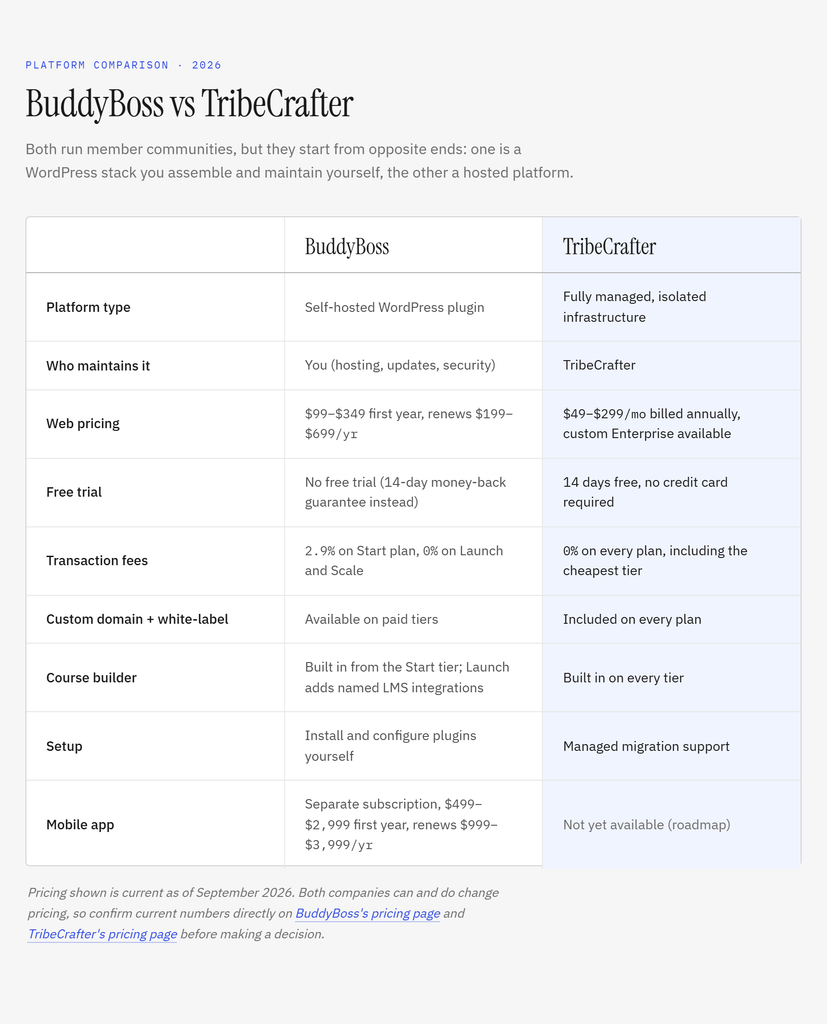
With BuddyBoss, you’re running your own WordPress stack: your own hosting, your own updates, your own security patching. Even on BuddyBoss’s Managed app tier, where their team builds and publishes the mobile app for you, the website itself is still yours to run; “Managed” there only covers the app build and publishing process, not the site.
TribeCrafter takes the simpler route: one managed platform, not a stack you assemble and maintain yourself. There’s no plugin ecosystem to keep patched, no server to watch, no update that might break your feed overnight. Your data still stays isolated, its own database, storage, and search, not pooled in with everyone else’s, but the bigger difference day to day is how much less there is for you to do.
Where BuddyBoss splits functionality and pricing across three web tiers plus three separate app tiers, everything on TribeCrafter’s feature set, including groups, courses, events, blog, and monetization tools, comes built into every plan starting at $49/month, with unlimited members on every tier. You’re not choosing between tiers to unlock 0% fees or course integrations. It’s already there, even on Starter.
TribeCrafter charges 0% platform fees on every plan, including the entry-level Starter tier, so nothing gets taken off the top of what you sell through your community beyond Stripe’s own standard processing fee, the same fee you’d pay Stripe on any platform. That’s a meaningful difference from BuddyBoss, where the Start tier stacks its own 2.9% fee on top of Stripe’s, for an effective cost of roughly 5.8% + 30¢ per sale. You can see TribeCrafter’s current plans here to compare against your real, all-in BuddyBoss number rather than just the sticker price, and try it free for 14 days before you decide.
Switching platforms is a real decision, not something to take lightly. Here’s what to actually expect.
Moving your community over is free, and it’s not something you do alone. As part of onboarding, TribeCrafter’s founder walks you through the whole move and helps import your members and profiles, working with you hands-on to set up your courses, groups, and content, rather than leaving you to handle the data entry yourself. It’s hands-on migration assistance, not an automatic transfer, so what moves over and how is worked out with you directly rather than guaranteed to match one-for-one.
Your ability to monetize your community through products and subscriptions carries over conceptually, even though the technical setup looks different since TribeCrafter isn’t built on WordPress.
Keeping members engaged through the transition matters just as much as the move itself, and the same member retention fundamentals that apply anywhere still apply here.
To be upfront: TribeCrafter doesn’t have a native mobile app yet. What you get today is a fast, fully-featured mobile web experience, your feed, groups, courses, and messaging all work well in any phone’s browser, with native iOS and Android apps on the roadmap.
If a branded app is still a must-have for you right now, weigh it against what BuddyBoss’s own app actually costs: a separate subscription running $499 to $2,999 in year one alone, on top of whichever web plan you’re already paying for, with its own renewal jump after that.
If you’re already deeply invested in a specific WordPress plugin ecosystem, have in-house technical support, or genuinely need that native mobile app right now, BuddyBoss can still be the better fit. None of what’s above is a knock on BuddyBoss as a product, it’s a mature, capable platform built for a different kind of user than the one this article is written for. This isn’t a one-size-fits-all decision, and growing a community well matters more than which platform badge is on it.
BuddyBoss was acquired in July 2024 by the WPBeginner Growth Fund, backed by Awesome Motive, the company behind AIOSEO, WPForms, MemberPress, and a long list of other WordPress plugins. Its original founders have since moved on.
TribeCrafter is bootstrapped, with no outside investors, so our roadmap answers to the communities on the platform, not a portfolio owner. That’s not a knock on acquisitions in general, but it’s a fair thing to weigh when you’re choosing a platform to build a community on for the next several years.
BuddyBoss and TribeCrafter solve the same problem in different ways. BuddyBoss means assembling and maintaining a WordPress stack yourself: patching plugins, watching license renewals, choosing tiers carefully to avoid BuddyBoss’s own transaction fee. TribeCrafter means one simpler, managed platform instead, with courses, events, and monetization already built in, 0% platform fees on every tier, and no plugin stack to maintain.
If the real cost and maintenance load of BuddyBoss are what brought you here, it’s worth seeing the difference for yourself. TribeCrafter offers a 14-day free trial with no credit card required, and moving your community over is free, with hands-on help as part of onboarding.
Explore TribeCrafter’s plans, or see the BuddyBoss alternative overview if you want the short version first, and see what running a simpler platform, without the maintenance tax, actually looks like.
- BuddyBoss means running a stack of plugins from different vendors, where any update can break a feature and no single vendor owns the fix when something does.

- BuddyBoss' advertised $99 price only covers the cheapest web tier, and on that tier, BuddyBoss' own 2.9% fee stacks on top of Stripe's standard processing fee, an effective cost of roughly 5.8% + 30¢ per sale. Moving to the $199 Launch tier removes BuddyBoss's own cut.

- Every BuddyBoss tier, web and app alike, uses a 50% introductory discount that jumps to full price at renewal: Start $99 to $199, Launch $199 to $399, Scale $349 to $699.

- The mobile app is a separate, three-tier subscription running $499 to $2,999 the first year, renewing at $999 to $3,999 a year, on top of whichever web plan you choose.

- A course creator running both web and app typically pays $1,400 to $4,700 a year in BuddyBoss's own fees alone, and often $1,500 to $3,000 or more once a separate LMS license, hosting, and developer help are added.

- Running a live community is heavier than WordPress was built for, which is part of why sites can slow down as they grow; TribeCrafter is fast & stable by default instead.

- BuddyBoss's own stack is three generations of software grafted onto a blogging tool: WordPress, then BuddyPress and bbPress, then BuddyBoss's fork of both. 91% of new WordPress vulnerabilities in 2025 were found in plugins, according to Patchstack's 2026 report, part of the real cost of running that stack yourself.

- TribeCrafter's founder, Faizan Shaikh, worked in BuddyBoss's own code fixing client bugs and has won two web performance contests, and still couldn't make a BuddyBoss site feel fast on a dedicated server. That's part of why TribeCrafter was built from scratch.

- Moving from BuddyBoss to TribeCrafter is free, with hands-on help as part of onboarding and a founder walking you through the move, rather than leaving you to import everything yourself.

- BuddyBoss was acquired in 2024 by an investment fund backed by Awesome Motive, and its original founders have moved on; TribeCrafter is bootstrapped, with no outside investors to answer to.

- TribeCrafter hands you that same ownership without the upkeep: your own domain and branding, plus your own isolated database, storage, and search, not pooled in with everyone else's, on a managed platform starting at $49/month with 0% platform fees and unlimited members on every tier, plus a 14-day free trial. It works well in any phone's browser today, with native apps on the roadmap.

- All pricing in this article is a snapshot as of August 2026. Confirm current numbers directly on each company's pricing page before you decide.BuddyBoss can be worth it for technical users already comfortable with WordPress who want deep customization control and full ownership of their own stack. It’s a mature, capable platform with a long track record.
Where it gets harder to justify is for non-technical community builders who just want to launch and grow without becoming their own IT department, or who don’t want to think through which tier avoids transaction fees. The real cost and maintenance load, covered above, is worth weighing before you commit.
It depends heavily on which web and app tiers you choose, and on what you add around them. The advertised $99 Start plan renews at $199, and on that tier BuddyBoss’s own 2.9% fee stacks on top of Stripe’s standard processing fee, an effective cost of roughly 5.8% + 30¢ per sale. Moving to the $199 Launch tier removes BuddyBoss’s own fee and renews at $399. Add a mobile app, priced separately at $499 to $2,999 the first year and $999 to $3,999 at renewal depending on tier, and a typical course creator running both web and app lands somewhere between $1,400 and $4,700 a year on BuddyBoss’s own fees once renewal pricing applies. Add a separate LMS license, hosting that can handle a real community, and occasional developer help, and the real total commonly runs $1,500 to $3,000 or more.
These figures are current as of August 2026; pricing can change, so it’s worth pricing out your specific setup on BuddyBoss’s site rather than relying on the $99 headline number.
Yes. BuddyBoss Platform is, by BuddyBoss’s own description, a fork and rebuild of both the BuddyPress and bbPress plugins. BuddyPress itself was an original project built by developer Andy Peatling starting in 2008, not a fork, and WordPress was originally forked from an earlier blogging tool called b2/cafelog back in 2003. So a BuddyBoss site runs on three layers of software stacked on top of a tool that started out as a blog.
BuddyBoss runs a live social feed, notifications, and search on top of WordPress, a platform originally built to serve blog posts, not real-time community activity. As a community grows, that load grows with it, which is why premium hosting and caching often become necessary just to keep things responsive, and why performance is one of the most common complaints from BuddyBoss users.
BuddyBoss was acquired in July 2024 by the WPBeginner Growth Fund, an investment fund backed by Awesome Motive, the company behind WordPress products like AIOSEO, WPForms, and MemberPress. The original BuddyBoss founders have since moved on. TribeCrafter, by contrast, is bootstrapped with no outside investors, so its roadmap answers to the communities using it rather than to a portfolio owner.
TribeCrafter’s Starter plan runs $49/month billed annually, Growth runs $149/month, and Scale runs $299/month, with a custom-priced Enterprise tier above that, current as of August 2026. Every tier includes 0% platform fees, unlimited members, courses, groups, events, and the blog, so there’s no separate tier to reach for lower fees the way there is with BuddyBoss, and no separate LMS license or hosting bill to add on top. You still pay Stripe’s standard processing fee on any sale, same as anyone using Stripe, but TribeCrafter itself never takes a cut. If you’re switching from BuddyBoss early, it’s worth asking about founding pricing when you start your trial.
Sort of. The core BuddyBoss Platform plugin is free and open-source, but the features most real communities need, like the BuddyBoss Theme and app integrations, are part of the paid tiers starting at $99 for the first year. There’s no free trial of the paid plans, though BuddyBoss offers a 14-day money-back guarantee.
Yes. TribeCrafter offers a 14-day free trial with no credit card required, so you can explore the full platform, including courses, groups, events, and monetization tools, before deciding whether to subscribe.
No. BuddyBoss is built as a WordPress plugin and theme, so it requires a WordPress installation to run. A managed platform like TribeCrafter runs independently instead, with nothing to install.
Yes, and it’s priced in three tiers of its own. Solo (one platform) runs $499 the first year, renewing at $999. App Launch (both platforms) runs $999, renewing at $1,999. Managed (fully done-for-you) runs $2,999, renewing at $3,999. You’ll also need your own Apple ($99/year) and Google ($25 one-time) developer accounts on top of whichever tier you choose. If the app subscription lapses, the app stops working even if your website keeps running fine.
Yes, and it’s worth knowing exactly how it stacks. On the $99 Start plan, BuddyBoss’s own 2.9% fee stacks on top of Stripe’s standard 2.9% + $0.30, so a sale effectively costs around 5.8% + 30¢. That fee only applies to sales through BuddyBoss’s own Memberships and Courses; selling through a third-party plugin like LearnDash instead brings BuddyBoss’s own cut to 0%, though the plugin itself is a separate paid license. Upgrading to the $199 Launch tier removes BuddyBoss’s own fee entirely, the same as Scale, leaving just Stripe’s standard processing fee.
Your site and app installations keep running, but you lose access to updates, security patches, and customer support. An expired license can’t be reactivated. You’d need to purchase a new subscription to regain access to updates and support.
Yes, and it’s free. Moving over is part of onboarding: TribeCrafter’s founder walks you through the whole process and helps import your members and profiles, working with you hands-on to set up your courses, groups, and content, rather than leaving you to enter everything yourself. This is hands-on migration assistance rather than an automatic, guaranteed one-to-one transfer of every record, since TribeCrafter isn’t built on WordPress and the technical setup looks different, so what moves over and how gets worked out with you directly during onboarding.
No. TribeCrafter runs on its own modern, managed infrastructure, with each community running on its own isolated database, storage, and search. There’s no WordPress installation, no plugin system, and nothing to self-host.
No platform fee, on any plan, including the entry-level Starter tier, whether you’re selling one-time products or running subscriptions. You still pay Stripe’s own standard processing fee, the same as anyone using Stripe, but TribeCrafter itself takes nothing on top of it.
Not yet. TribeCrafter works well in any phone’s browser today, and a native app is on the roadmap. If a branded app is essential for your community right now, that’s worth factoring in, especially alongside what BuddyBoss’s own app costs separately.
Help shape TribeCrafter. Build and monetize your community, and tell us what you need next.
No credit card required
Get the best community growth
strategies delivered to your inbox.