NSNadia S.Weekly assignments · 2 h
One street, five frames, no zoom. The third one finally worked.
18 reactions9 comments
Switching / Skool
The founder sets it up with you. Your members keep a simple community, now with your logo and colours, a blog and a landing page next to it. You're paid into your own Stripe account, and we take 0%.
14-day free trial, no cardCancel anytime30-day refund on your first payment
AllStreetEditingGear
One street, five frames, no zoom. The third one finally worked.
Which lesson covers shooting into the light?

I set it up with you on a call, and I answer your questions after you go live. Studio, where you run it all, stays simple: turn off courses, events or the blog until you need them, and a new community only has to fill in six things before it goes live.
Faizan, founder and technical lead
Setting up our community on TribeCrafter was smooth, and Faizan and his team were right there whenever we needed help.Anders Olsson, founder of Conscious Breathing Institute

The menus are grouped in a way that just makes sense. It's not complex at all, super self-explanatory, and easy to pick up.Cheerlyn, Creative Director at Great Big Photography World
Our founder looked after Great Big Photography World's BuddyBoss site for years before they moved to TribeCrafter.
The community your members know, plus a blog, a landing page and selling, in one product with no add-ons.
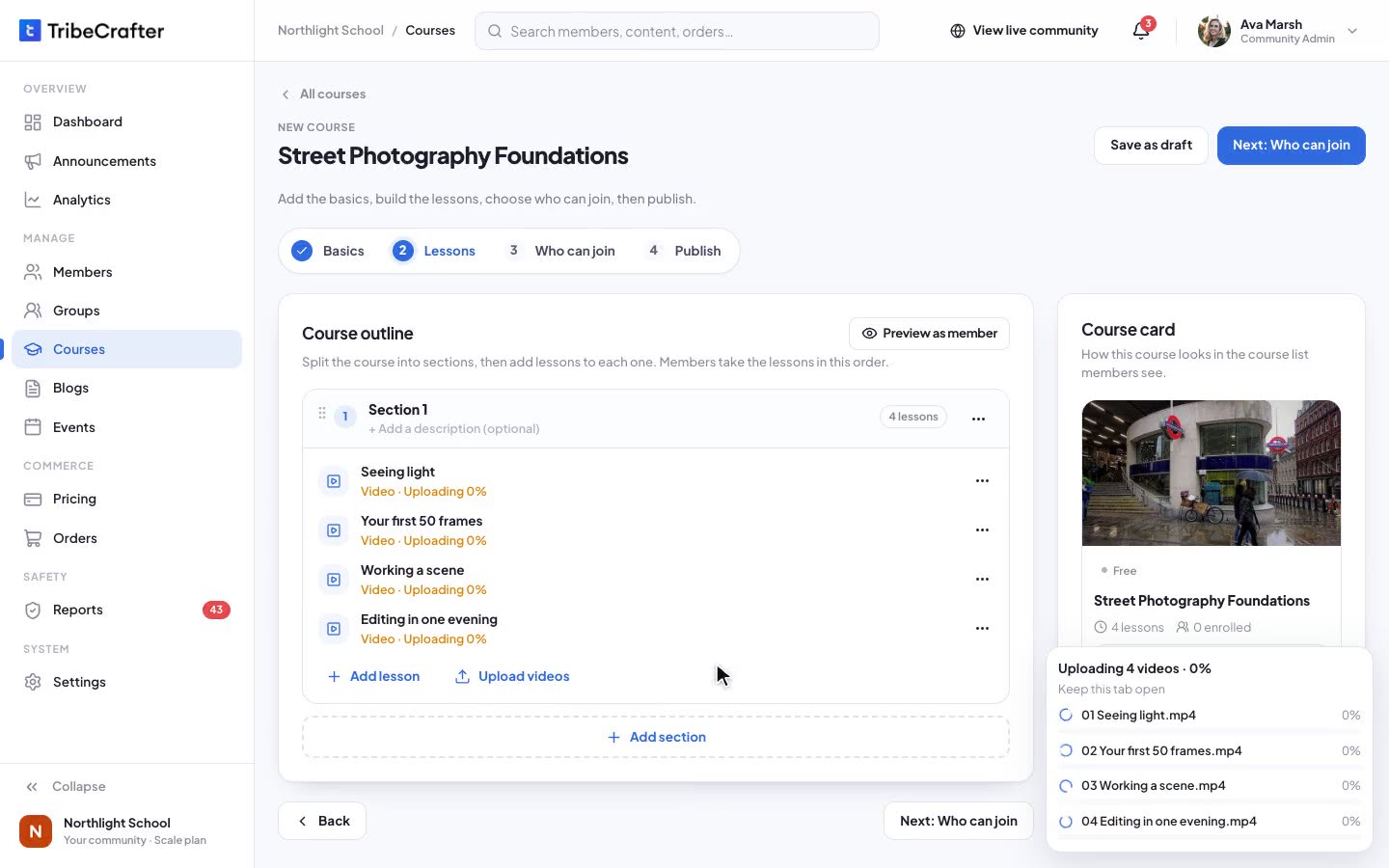
Hosted video, free preview lessons, progress and resume, drip by section and certificates. Sell a course on its own, in a bundle, or as part of a plan.
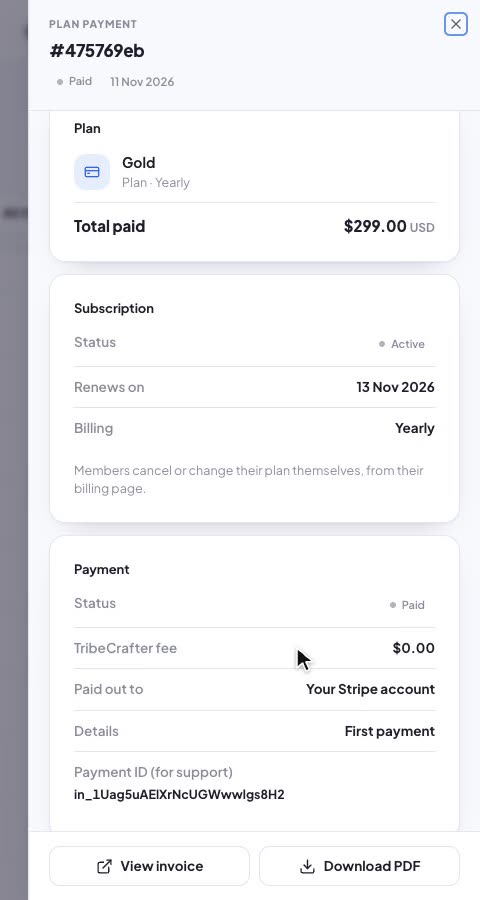
A real order in Studio: $299 paid, TribeCrafter fee $0.00, paid out to your own Stripe account. Monthly and annual plans, and one-time products.
A landing page and a blog on your own domain, with public posts anyone can find and premium ones for members. A call-to-action block in a post sends readers on to join. Member emails come from your own domain too.
Against Skool Pro you pay less each month; against Hobby you skip the 10% cut. The bigger difference is whose Stripe account and brand it is.
| What you get | TribeCrafter | Skool |
|---|---|---|
| Price | $49/moStarter, billed annually; $65 billed monthly. Unlimited members and every feature on every plan. Starter has 100 GB of storage, 3 team seats and video up to 1080p. | $99/mo ProAbout $82.50/mo billed yearly (2 months free). Hobby: $9/mo. |
| Fee on your sales | 0% platform feePlus Stripe's normal fees | Pro: 2.9% + 30¢3.9% + 30¢ on single payments over $900, card processing included. Hobby: 10% + 30¢. |
| Where payments go | Your own Stripe accountPaid out to your bank on Stripe's schedule | Through SkoolSkool processes payments and pays out weekly; you can't use your existing Stripe account |
| Your brand | Your logo, colours and domainThe community, blog and landing page at an address like community.yourbrand.com, and member emails from your own domain | Your group inside SkoolA custom skool.com/yourgroup address on both plans. Members still sign in and use your group inside Skool's layout and app. |
| Blog and landing page | Both includedPublic posts search engines can find, premium posts for members, and a landing page you set up in Studio | No blogEach group has an About page on Skool |
| What you can sell | Courses, groups and premium postsEach on its own, in a bundle or in a plan. Monthly and annual plans, and one-time products. | Membership and coursesPaid membership to your group, and single courses at a one-time price (Buy Now) |
The plan plus the fees on your sales. Every column also pays 30¢ per payment.
$9 plan + 10% of $3,000.
TribeCrafter: about $136 to $173 less
$99 plan + 2.9% of $3,000. About $169.50 if you pay Skool yearly.
TribeCrafter: about $13 to $34 less, both paid yearly
$49 plan billed annually + Stripe's 2.9% + 0.7% Billing, if all $3,000 is subscriptions. $136 if it's one-time sales. $173 if you pay us monthly.
How the fees work: Skool's fee includes card processing. On TribeCrafter you pay Stripe's standard US card fee, 2.9% + 30¢, and on subscriptions Stripe also charges its Billing fee, 0.7%. International cards cost more on Stripe. Sources: skool.com/pricing, Skool's help center (Skool Payments FAQs, Traffic Sources & Growth Boost, one-time course purchases, changing your group URL), checked 12 Nov 2026; Skool Communities on the App Store and Google Play; Stripe Billing pricing; TribeCrafter's pricing page. We re-check them every time this page changes.
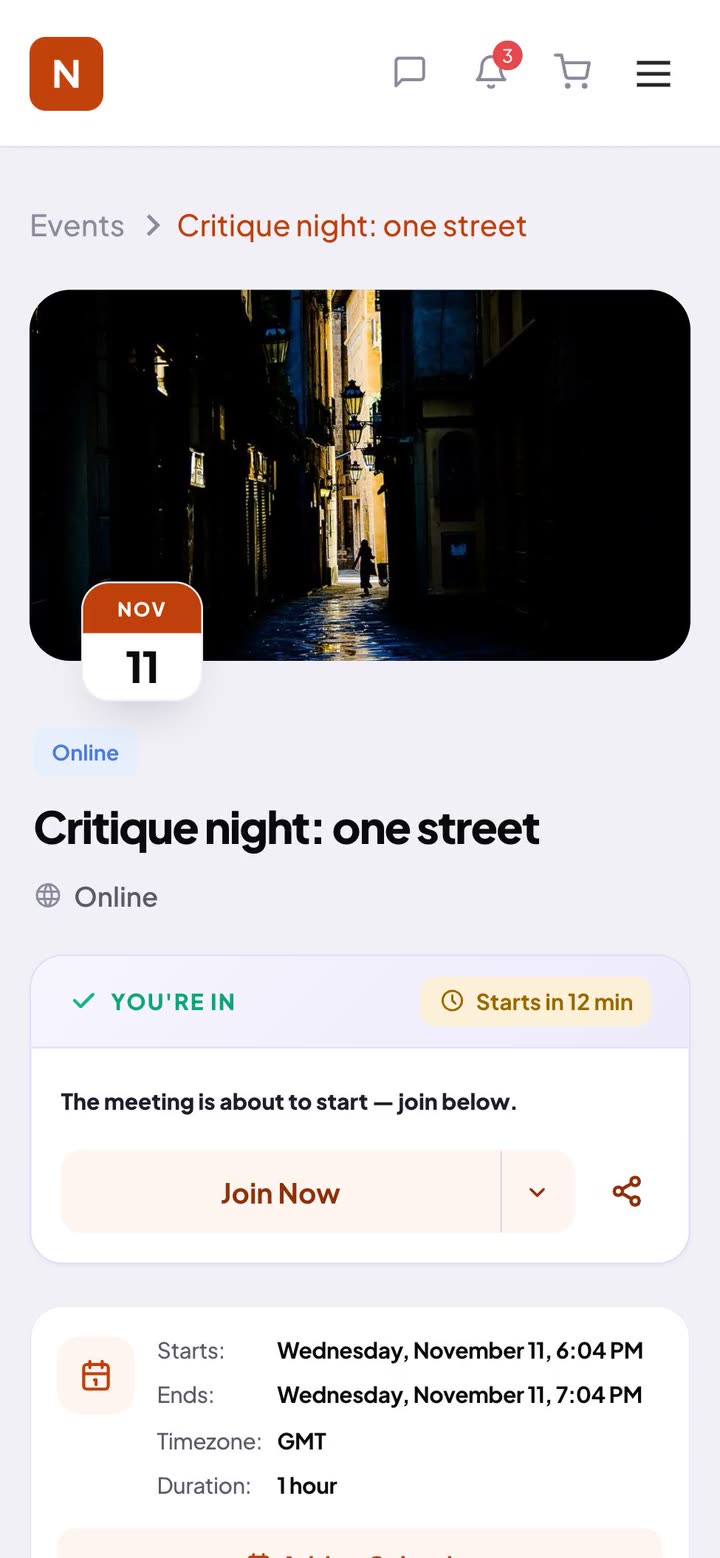
This is what keeps members coming back, on a laptop or in their phone's browser, like the event page here.
You rebuild your classroom in Studio, and the founder walks you through it. Members join with your email invite, and your Skool group stays open while they come over.
I answer support myself, and a small team builds the product with me. On a 30-minute call we look at what you want to run and how to set it up here.
Faizan, founder and technical leadGive them an easy path. Invite them by email, post a link to your community in your Skool group, and have content waiting on day one. Keep the Skool group open for a few weeks with a pinned post that links to your new community, so members who check in late still find their way over.
Your courses you rebuild in Studio: upload a folder of videos or paste links. Members join with your email invite and pick a login. Posts and comments stay on Skool, so pin a "we've moved" post there and open the new community with a few fresh threads waiting.
Their card details stay with Skool, so they subscribe again on TribeCrafter. In Studio, give each paying member the access they paid for, at no charge, until the date their Skool period ends. Make sure their Skool subscription is cancelled before it renews, so nobody pays twice. When that date comes, they subscribe on TribeCrafter. The founder helps you plan the timing and the announcement.
Not for YouTube, Vimeo or Wistia: paste the link into the lesson. For other hosts, such as Loom, download the videos and upload them. Pick a whole folder at once, and each video becomes a lesson.
Ask within 30 days of your first payment and we refund it in full. After that, cancel anytime.
Yes. Turn off courses, events or the blog while you don't use them, and chat any time. Each staff role sees a smaller Studio menu.
Set it up yourself, or book 30 minutes with the founder first and ask anything.
14-day free trial, no cardCancel your plan anytime30-day refund on your first payment